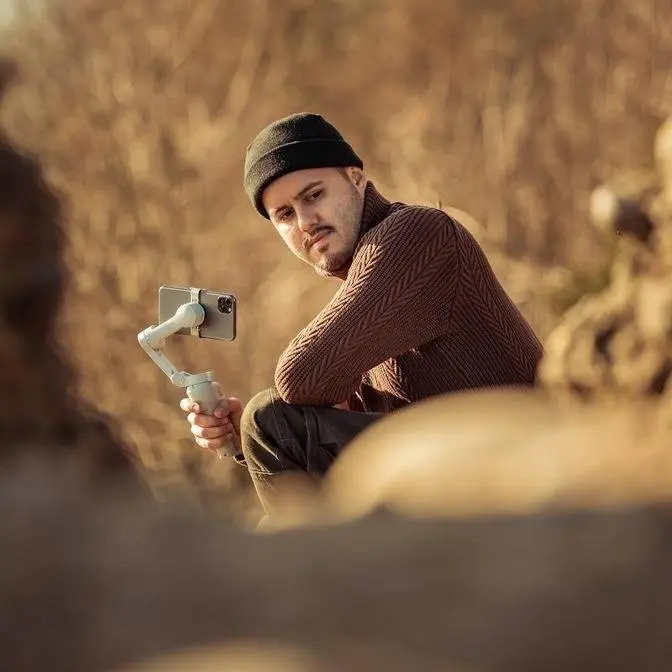
Built for solo creators, the iSteady V3 Ultra features hands-free gesture control, a detachable remote, and live preview for framing your shots in real time. See how its smart tracking and touchscreen interface make filming alone easier than ever.
DISCLAIMER Some links are affiliate links, where I earn a small commission if you click on the link and purchase an item. You are not obligated to do so, but it does help support this YouTube channel and allow me to continue making videos for you. I appreciate your support!
TIMESTAMPS: 00:00 - Introduction 00:32 - Live Feed Monitoring 02:47 - Ai Tracking 03:49 - Gesture Control 04:21 - Infinite Pan Tracking 04:39 - Higher Payload 05:07 - Similar Features 05:30 - Mic 06:28 - Vlog Test 08:31 - Final Thoughts
The Home I Steady V3 just got a major
upgrade and it might be one of the most
underrated release this year. They call
it the Home IE V3 Ultra. This new gimbal
features a touchscreen remote, live
preview, 360° pan shots, and a heavier
payload capacity up to 400 g, giving you
more flexibility with third party
accessories. In this video, we'll break
down what's new, what it can do, and how
it compares to other popular gimbals
like the DJI OM7P and Insta3 Flow 2 Pro.
Also, big thanks to Hen for sponsoring
this video. So, let's kick things off by
going over the new features of the IE V3
Ultra. And by the way, if you're
interested, I made a full video on the
original I Steady V3. I'll leave a link
below. That video covers everything you
need to know about the V3 and many of
those features also apply to the Ultra.
The first standout feature is the live
feed monitoring. This was originally
introduced on the Home I Steady M7,
which is designed for heavier setups. I
really liked it on the M7, so I'm glad
they brought it into the Ultra. It's one
of the biggest things that sets the V3
Ultra apart. None of the other compact
gimbals like the DJI M series or Insta3
Flow offers a touchscreen remote control
with live preview. With the regular V3,
you had to rely on small buttons and
memorize the functions. Now, thanks to
the touchscreen, everything is clearly
labeled and easy to use. You can change
orientation, switch modes, access roll,
rotation, and more, all from a bright,
colorful display that's smooth and
intuitive to navigate. At the top of the
screen, you'll also see useful
information like battery level for both
gimbal and remote, voodoo status,
current mode, and AI tracker indicator.
Swiping to the first page gives you a
live preview of what the AI tracker
sees, which is a gamecher, especially
when filming yourself. The remote is
still detachable like on the regular V3,
but now you can actually see your shot.
It has a range of 10 meters, and even
when it's detached, you still get full
control. A joystick to move the gimbal,
a record button, and a side button that
works like the trigger on the gimbal to
recenter or flip the camera. There's
also a USBC port on the bottom to charge
the remote, or it charges automatically
when docked to the gimbal. Now, even
though the screen is 1.22 in, it's
sharp, the colors are accurate, and it's
more than good enough to comfortably
monitor your shot. While gimbals like
the DJI Ohm series and Insta3 Flow offer
Apple Watch control with live preview,
not everyone has an Apple Watch and it
only works with iPhones. Plus, it also
requires more setup steps. The V3 Ultra
is much simpler. Just swipe right and
you're good to go. Now, the only
downside to a detachable remote is that
if you lose it, there's no backup
control method, so be careful with it.
You can activate tracking directly from
the remote. It detects a subject by
placing a yellow box around their face.
And to start tracking, just double tap
the yellow box until it turns green. You
can also press the side button once. And
since the side button mirrors the
trigger on the gimbal, you can also
press that once to activate tracking
directly from the handle. Once tracking
is on, you can even adjust composition
using the joystick. Perfect for getting
creative with framing while the gimbal
handles the motion. It does a great job
of keeping you centered in the frame and
it can even track specific parts like
your hand accurately. To stop tracking,
press the site button again or tap once
and the green box will turn yellow.
Unlike the DJI OM 7P, which only tracks
people, the V3 Ultra can track objects,
too. Just draw a box around anything and
it locks on. The improved tracking comes
from the upgraded AI tracker camera, now
at 2 megapixels instead of one. And that
extra resolution helps it follow your
movement more precisely, even at a
distance or during fast motion. Another
way to track yourself is using gesture
control, also available on the regular
V3. Hold up the okay sign to start
tracking or your palm to stop it. You
can take a photo or start and stop
recording with this simple hand gesture.
And to switch between portrait and
landscape mode, just hold up your thumb
and turn it. By holding up the L sign,
you can adjust your composition. Once
positioned, hold up the L sign again and
you have your new composition. It's
super convenient for solo creators who
don't want to use the physical controls
and want a hands-free setup. The V3
Ultra also introduces infinite pan
tracking. On the regular V3, panning was
limited to 360°,
but now you can do a full 360° pan
without any restrictions. It's perfect
for immersive vlogs or scenes where you
want to show off your surroundings.
Another big upgrade is the payload
capacity. Most foldable gimbals,
including the regular V3, DJI, and
Insta3 models are limited to 300 g, but
the Ultra supports up to 400 g, giving
you more freedom to mount heavier
accessories like third party lenses.
Most gimbals can handle a V&D filter,
but heavier lens setups usually cause
issues. This upgrade makes a real
difference. I do wish there was a
counterweight system to ease the strain
on the motors. Maybe something we'll see
in the future version. So, those were
the main differences between the IE V3
and the new Ultra. That said, many of
the great features from the V3 are still
here. The foldable design, secure clamp,
built-in extension rod, tripod legs,
fill light, and of course, the excellent
stabilization, all essential for
smartphone creators. Again, if you want
a deep dive into the regular V3, that
video is linked below. Now, Hom also
sent me their Mic One wireless lav mic,
which includes two transmitter and one
receiver in a compact magnetic charging
case. It's perfect for vlogging,
plug-andplay. The receiver draws power
from your phone, and the transmitter
auto pairs once removed from the case.
It offers up to 20 hours of total
battery life, 7.5 hours per transmitter,
supports mono stereo recording, and has
a micro SD backup to 32 GB. good for
about 94 hours of audio. Then there are
three noise cancellation levels. Blue
means it's turned off for a natural
sound. Green means you have the standard
noise cancellation on and yellow means
strong noise cancellation is enabled.
You also get real-time headphone
monitoring and five levels of gain
control. It records at 48 kHz 16bit and
has 100 meter transmission range.
Overall, it's a really easy to use,
featured packed and flexible mic system
for creators on the go. So, let us test
out the noise cancelling feature on the
HA mic. Right now, I have it turned off,
but when I press this button,
now noise cancelling is enabled. And
currently, it's set to weak. And if I
press the button one more time, it will
set it to strong.
And now it is set to strong. And this is
how it sounds like. Now, in order to
hear the difference, let me turn off
noise cancellation.
And now I have noise cancellation turned
off and this is how it sounds like. All
right folks, let's do a little vlog
test. I have the iPhone 16 Pro Max
mounted on the Home I Steady V3 Ultra
and I'm also walking during this vlog.
This way you can see how steady the
footage is. I'm also using the extension
pole. This way I can be further away
from the camera. And I'm also using the
ultra wide angle lens. This way I can
fit more in the frame. Now I'm using the
rear camera. So, I can't really see
myself, but what's really great is that
I can use the tracker, which will always
keep me centered in the frame no matter
where I move my camera. And this way, I
don't have to worry about being cut out
of the frame. Now, I'm also using Home's
mic, which you are listening to right
now. And I also have my earphones
plugged in. This way, I can monitor the
audio. Now, usually I would just quickly
listen to the audio and if everything
sounds good, I would unplug it and use
it without the earphones during the
vlog. But just for demonstration
purpose, and I can actually hear my
voice in real time, which is great. Now,
for additional reinsurance, what's great
about the Ultra is that I get a live
feed that shows me what the camera is
seeing. This way, I can check the
framing and just see if everything looks
good. So this way I can really record
with the rear camera. No problems at
all. And I have everything I need right
here. Uh so there's no reason not to
vlog with this setup. Now this isn't
just a minor refresh like some other
gimbals. The IE V3 Ultra brings real
meaningful upgrades. Home isn't just
keeping up. They're pushing forward and
standing out in the mobile gimbal space.
And I know how fierce the competition
is. Now, if you already own the regular
V3, depending on your needs, upgrading
to the Ultra might make sense,
especially if you're a solo creator who
films yourself a lot. Live preview and
infinite pan tracking really enhance the
shooting experience, and especially if
you're an Android user who can't use
Apple Watch feature offered by other
brands, having this live feature really
makes your life easier. Now, if you're
getting your first gimbal, I would
recommend going straight for the Ultra
as a direct upgrade. Now, if you do want
to learn more, I will link Home's
website below. I hope you found this
video helpful. If you have any
questions, feel free to leave a comment
below. I'm happy to answer them. If you
want to learn more about the regular V3,
be sure to check out this video right
here. Other than that, thank you so much
for watching. Take care and see you in
the next video.
[Music]
[Applause]
[Music]