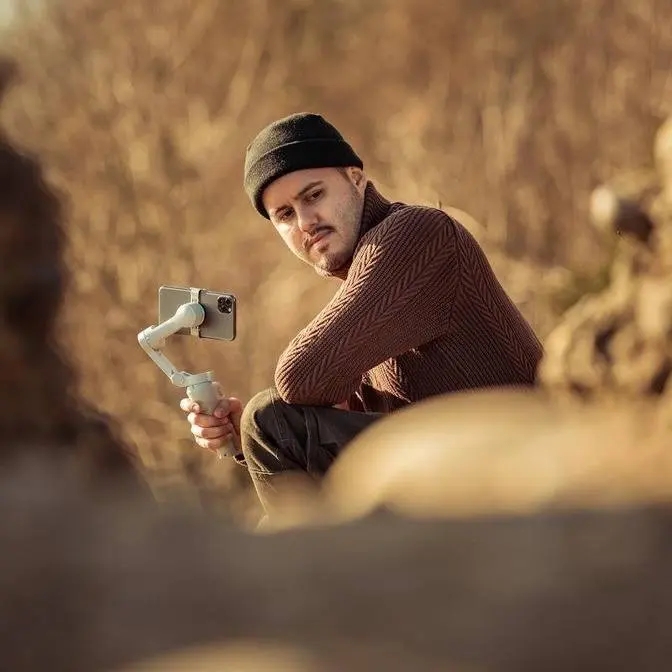
Using a Galaxy Ultra or other Android flagship? Insta360 Flow 2 Pro helps you get smoother, clearer videos — whether you’re shooting wide or zoomed in. Don’t waste those powerful cameras!
DISCLAIMER Some links are affiliate links, where I earn a small commission if you click on the link and purchase an item. You are not obligated to do so, but it does help support this YouTube channel and allow me to continue making videos for you. I appreciate your support!
If you're looking for a smartphone gimbal that's not just compatible with Android phones,
but also packed with advanced features like AI tracking, seamless stabilization,
native multi-lens control, and more, you need to check out the Flow 2 Pro from Insta360.
It's easily the most advanced gimbal on the market today. In this video, I'll show you
the best features of the Flow 2 Pro with the S26 Ultra so you can get the most out of your gimbal
Big thanks to Insta360 for sponsoring this video.
Now, the Flow 2 Pro isn't just a regular smartphone gimbal.
In the past, most looked for gimbals that stabilize footage well.
And these days, stabilization is solid on most gimbals.
So what really matters are the extra features, and that's where the Flow 2 Pro really shines.
It's truly an all-in-one creation tool that works for a wide range of shooting needs,
not just for iPhone users, but also Android users too.
Now, I know that on my channel, most of the demonstration with gimbals was done on an iPhone,
but the Flow 2 Pro works just as well with Android phones.
And I want to give Android users a chance to see what it can do,
and I'll be using the Samsung Galaxy S26 Ultra.
Now, as a mobile creator who's always on the go, I don't want to carry heavy equipment.
I want something light, easy to use, and ready in minutes.
And the Flow 2 Pro delivers exactly that.
I can mount the clamp, attach my phone to the gimbal,
unfold it, and I'm ready to go in seconds.
No balancing needed.
And also with the AI tracker, which we'll talk about later,
I don't even need someone else to help me film.
The Flow 2 Pro is really packed with a ton of features.
A three-axis gimbal for smooth shots.
You can easily shoot horizontal or vertical.
It has a built-in selfie stick to fit more in the frame and capture creative angles.
It has built-in tripod legs for hands-free filming.
A free teleprompter right inside the Insta360 app for script-ready recording.
And even a power bank to charge your phone so you can keep shooting longer.
And that's just scratching the surface.
Let's dive into the top features that make this gimbal amazing for Android users.
The first feature I want to show you is the AI tracker.
And honestly, it's my favorite because it keeps you perfectly centered in the frame.
It's awesome for vlogging, solo filmmaking,
tutorials, or basically any time you need to stay in the shot.
On Android, you can use subject tracking in both the native camera app and third-party apps.
Just connect the AI tracker and you're ready to go.
You can start tracking with hand gesture by holding up your palm
or press the trigger button once and it will detect and follow the subject.
It works up to 10 meters and if you duck behind something,
it will find you again and keep tracking smoothly.
So let's now test out subject tracking on the Flow 2 Pro using the Samsung Galaxy S26.
I'm gonna hold up my palm and now you can see it detected me and will start tracking me,
keeping me centered in the frame.
But what happens if I hide behind a tree and now reappear?
You can see it re-identifies me.
I'm gonna hide again, come back out and it still detects me, which is pretty awesome.
And it does it really smoothly too.
Just have to make sure I don't fall.
Okay.
One thing I love is the 360 degree infinite pan tracking.
The gimbal rotates fully for a smooth tracking,
perfect if you want to move around or cover a bigger scene.
I can literally walk around the gimbal and it will keep following me no matter where I stand.
This is really cool, especially if you want to showcase something,
you know, you want to show your surroundings or do a demonstration.
So you don't have to worry about being cut out and it does it really accurately, which is cool.
Now for more advanced tracking, the Insta360 Companion app is really handy.
You can turn on front cam auto tracking.
So when you switch to the front camera, tracking starts automatically.
Now I usually film B-roll with the rear camera
and then flip to the front camera for vlogging, which happens super seamless.
But of course you can also film yourself with the rear camera.
If you want a more higher quality output,
just press the trigger button three times to flip the camera,
then press it one more time to start subject tracking.
All right.
And now I'm using the rear camera, the 1X lens, and I also have the tracking enabled.
You can see as I move my head, it keeps me centered.
Now I can't see myself, but I do have a selfie mirror for reference.
And with subject tracking, I'm pretty sure that I don't have to worry about being cut out.
Now in the app, you also have the pro framing grid,
which gives you nine squares to help set your tracking position for more interesting shots.
For example, I can position myself in the upper left corner
to create a more dynamic composition while still being tracked perfectly.
Now, another thing that is cool is object tracking.
It's great for product videos, for example,
or if you want to track, you know, any objects like a tree,
you can just draw a box around what you want to track or press the trigger
and it follows it perfectly.
So let's test object tracking.
I'm going to draw a box around my iPhone and you can see it detected immediately.
And when I move it, it follows it.
When I put it behind my back and you can see it re-identifies it,
which is pretty crazy and it does a really good job.
Now as a vlogger, if you're filming multiple people,
multi-person tracking is a lifesaver.
It keeps the frame balanced and lets you pick a main subject.
So even if someone moves out of the shot, the main person stays tracked.
So you can see all in all the Flow 2 Pro gives you tons of tracking freedom
for almost any situation.
Another great feature is that you can use the native lenses
on your Android phone inside the Insta360 app.
On the S26 Ultra, that means you can use all three focal lengths,
the 0.6x, the 1x and the 5x lenses.
So you're using the phone's optical lenses instead of digitally zooming in.
And switching between them is super easy with the smart wheel,
letting you change focal lengths quickly without touching the screen.
And you can still zoom if needed.
And you can even adjust the zoom speed in the app settings.
Now the Insta360 app also lets you create 360 degree panorama photos
with the Flow 2 Pro.
You can even make a tiny planet effect using the 360 panorama mode.
The app automatically stitches the shot for you
and you can pick your favorite angles to get the right effect.
When it comes to creative shots, the Flow 2 Pro makes it really easy.
Crane shots and low angle shots, which used to be tricky,
are now simple to pull off.
These shots are great for introducing a scene
and adding dynamic movement to your video.
And to enter free tilt mode,
I can extend the pole and angle it towards me
and then simply turn it to the left.
And I've now entered free tilt mode.
And this really gives you unlimited tilt range.
So it tilts 360 degree without any limitation.
And by having it this way,
you can also create a natural motion for the crane shot.
Whereas with other gimbals, you have to position yourself awkwardly.
Now you also have a barrel mode,
which is another creative feature to get even more dynamic shots.
When you press the C button long,
the camera automatically rotates,
letting you focus on your gimbal moves.
And if you want more control,
you can manually rotate the camera by setting it to FPV
and then using the smart wheel to rotate it.
Or you can also do this handheld, however you like.
And it's a really cool effect
that you can easily implement into your videos.
Now, if you want a more professional setup,
the Flow 2 Pro can handle it.
It has a maximum payload of 300 grams.
So you can easily attach a case and an ND filter
like the one from Freewell
to get a more film-like result in your videos.
You can also pair it with the Insta360 Mic Air
for higher quality audio.
And the whole setup stays minimal and easy to carry.
And I'm also using the Insta360 Mic Air,
which you're listening to right now.
I think it's a great combination,
gives you really a minimalistic setup.
I can just simply connect the receiver,
turn on the transmitter, and I'm ready to go.
It's really plug and play.
All right, folks, and that is the Flow 2 Pro.
As you can see, it is packed with features
and you really can't go wrong with it.
If you want a simple, easy to use smartphone gimbal
that helps you get stable and creative shots
with your Android phone, this is a great choice.
So be sure to get the Insta360 Flow 2 Pro,
your pocket AI filmmaker.
The first 10 orders will get up to 30% off,
as well as a free maxi phone mount.
Don't miss out on the biggest discount of the season
to upgrade your gear in 2026.
Thanks for watching, and I'll see you in the next one.